How to Edit Information in NBI Clearance Online

NBI Clearance is a useful document for employment and many other purposes. But the NBI Clearance must contain correct information about the applicant. If there is any mistake, the applicant should know how to edit information in NBI to correct the mistakes and update their personal information in NBI.
The applicant cannot edit information directly in the NBI Clearance but they can edit information in their NBI Account/Profile and apply for NBI Clearance to get an updated clearance certificate from the National Bureau of Investigation.
What Information Can I Edit in NBI?
You can edit four types of information in NBI records including Applicant Information, Contact Details, Family Background and Other Information. Let us explore each information type in detail.
[1] Applicant Information
If there is an error in your personal information in NBI, you can edit it to correct the error(s).
- Applicant’s First Name (personal visit required)
- Applicant’s Middle Name
- Applicant’s Last Name (personal visit required)
- Nickname
- AKA/Other Name
- Gender
- Civil Status
- Birth Date (personal visit required)
- Birth Place
- Citizenship
Example-1 (Birth Place): There is a spelling mistake in your birth place in NBI Records, so you can correct it by using edit information option.
Example-2 (Civil Status): Your civil status is changed from Unmarried to Married, so you need to update it in NBI using edit information facility.
Example-3 (Surname or Last Name): Women applicants change their Surname after marriage, they should update it in NBI to reflect their new surname in NBI Clearance.
[2] Contact Details
In contact details, you can edit information to change/update following details_
- Applicant’s Address [Correction/Update in Residential Address]
- Email Address (personal visit required)
- Mobile Number
[3] Family Background
In family background section, you can edit personal information about your father, mother and your spouse.
- Father Name and Father Birth Place
- Mother Name and Mother Birth Place
- Spouse Name and Spouse Birth Place
[4] Other Information
In other information section, you can edit information related to your education, occupation and appearance.
- Applicant’s Educational Attainment
- Applicant’s Occupation
- Religion
- Height
- Weight
- Skin Complexion
- Identifying Marks on Applicant’s Body
So, you can edit all this information in NBI to change/update your personal data in NBI Records and NBI Clearance.
Documents Needed to Edit Information in NBI
The applicant can edit information in NBI Records to update their personal information in NBI Clearance but they must provide supporting documents. The applicant needs to provide documents related to the information they want to edit/update in NBI.
Here I provide the list of documents needed for concerned information editing in NBI as under_
| Edit Information List | Required Documents |
| First Name, Middle Name, Last Name | Original National ID or UMID or Any Government Issued ID |
| Birth Date, Birth Place | Original Birth Certificate authenticated by PSA (Philippine Statistics Authority) |
| Citizenship | National ID or Original Passport |
| Civil Status | Original Marriage Certificate or Divorce Certificate or Spouse’s Death Certificate |
| Applicant’s Residential Address | Recent Utility Bill or Tenancy Contract |
| Email or Mobile Number | No Documents Needed, Physical Visit Required |
| Father Name or Mother Name or Spouse Name | Original Government Issued ID of Concerned Family Member (Father/Mother/Spouse) |
| Father’s Birth Place orMother’s Birth Place orSpouse’s Birth Place | Concerned Family Member’s Original Birth Certificate authenticated by PSA (Philippine Statistics Authority) |
| Applicant’s Educational Attainment | Relevant Degree Certificate or Equivalent Document |
| Applicant’s Occupation | Job Offer Letter or Salary Slip/Certificate |
| Religion | Official Letter from Concerned Religious Authority |
| Weight, Skin Complexion and Identifying Marks | No Documents Needed, Physical Verification Required |
How Do I Edit Information in NBI?
There are two ways to edit information in NBI, you can edit your personal information either online or offline/in-person.
- Edit Information in NBI Online
- Edit Information in NBI Offline
You can log on to NBI Clearance website to edit information online. In case you want to edit information in NBI offline, you are required to visit an NBI Clearance Center near you. Let me explain both the methods in detail.
How to Edit Information in NBI Online
In order to edit information in NBI Online, you must login to your NBI Account at NBI Clearance website portal. Kindly follow the steps given below to edit your personal information in NBI online.
#Step 1: Open NBI Clearance Portal and Sign In

On your computer or mobile device, open a web browser and go to NBI Clearance website portal @clearance.nbi.gov.ph. You can see the sign-in section on upper right of the homepage.
You should enter your registered Email and Password correctly, then click on Sign In button to sign in to your NBI Account.
#Step 2: Select Application tab and Click on Edit Information
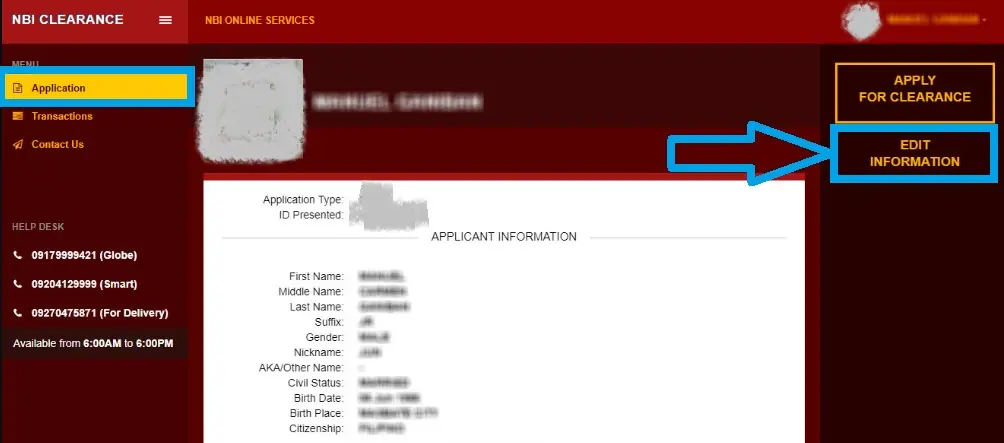
After successful sign in, find out Application tab on left side and click on it. As you click on the Application tab, you will see two options i.e. Apply for Clearance and Edit Information.
Click on Edit Information to open the online clearance form with your personal information on screen.
#Step 3: Edit Information that Need to be Updated
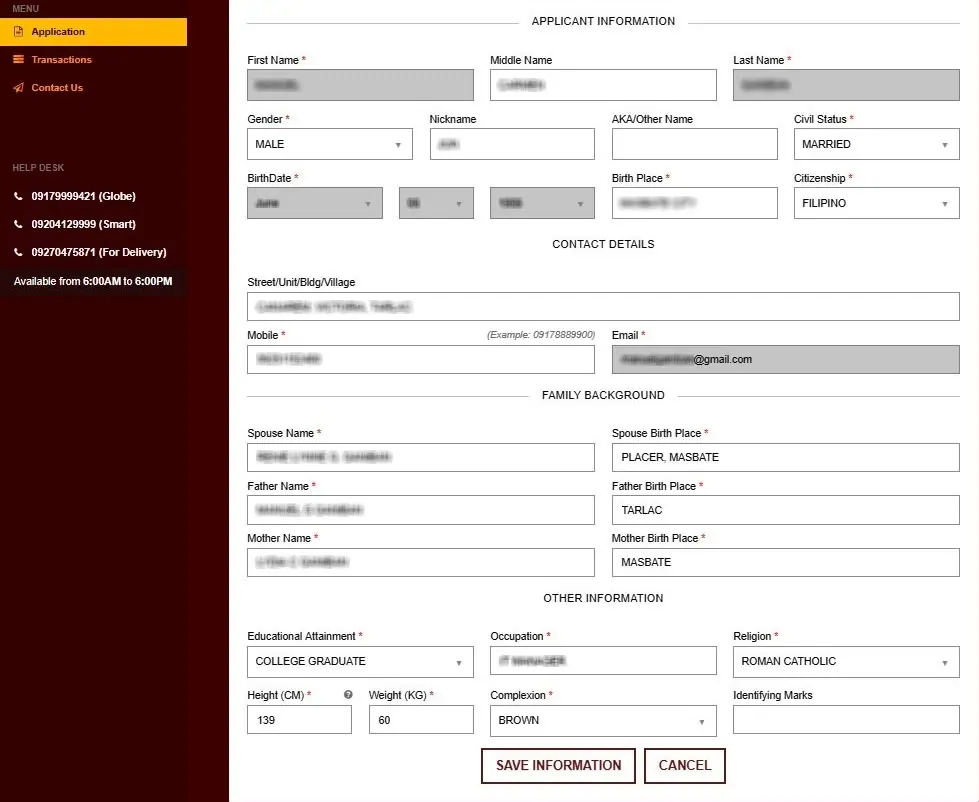
In online form, you should edit the information that you want to update. If there is a spelling mistake in any info, you can edit and update it. If your civil status is changed recently, you can edit and update it.
You can also edit/update your birth place, mobile number, educational info, occupation, spouse info and other details as per your requirement. Make sure that the updated information is accurate and correct as per your present condition.
#Step 4: Save Information and Provide Supporting Documents
After editing required information, you should click on Save Information to continue. If a message shows up for documents required to update information, you should upload supporting documents as requested.
#Step 5: Sign Out and Sign In Again to Verify the Changes
After completing edit information task, you should sign out of your NBI Account. Thereafter sign in again and click on Application tab. Then click on Edit Information to verify if your information is updated in NBI Records or not.
If you see the old information then you should sign out and check it after 24 hours. On the next day, you can sign in to NBI Clearance Portal to check if your information is updated.
If the information is updated then you can apply for NBI Clearance to get a New Clearance from NBI with updated personal information. In case your information is still not updated, you can contact NBI Clearance Help Desk or visit your nearest NBI Clearance Center.
How to Edit Information in NBI Offline
The National Bureau of Investigation provides New NBI Clearance Application and NBI Clearance Renewal services at all NBI Clearance Centers in Philippines.
In case you want to edit your personal information in NBI offline, you can visit an NBI Clearance Center near your place. When you visit the NBI Clearance Center to edit information, you can apply for NBI Clearance to get a New NBI Clearance with updated personal information.
#Step 1: Find and Visit Your Nearest NBI Clearance Center
First of all, you should find an NBI Clearance Center in your city/village. You can check NBI website (www.nbi.gov.ph) or simply search NBI Clearance Center in Maps App on your mobile. Once you get the address and location, visit the NBI Clearance Center with all required documents to edit your personal information.
#Step 2: Talk to the NBI Service Employee
After you reach the NBI Clearance Center, enter the office and find a help desk. You should talk to an NBI Service Employee and discuss about the information you want to edit/update in NBI Records and your NBI Clearance.
#Step 3: Get NBI Clearance Application Form
You should request the NBI Employee to give you an NBI Clearance Application Form. Kindly note that the form is free, the NBI does not take any fee for the blank clearance form.
#Step 4: Fill up the Application Form with Updated Information
Now you should fill up the NBI Clearance Application Form with your updated personal information. Make sure that you provide updated and accurate information in the NBI Application Form without any spelling mistakes or other errors.
#Step 5: Attach Required Documents and Submit the Form
After filling up the form correctly, attach two government issued IDs and other required documents including supporting documents for editing information in NBI Clearance and NBI Records.
#Step 6: Pay the Fee, Get Your Photo, Signature and Biometrics Captured
Pay NBI Clearance Fee to the service employee and collect fee payment receipt. Thereafter go to biometrics section to register your fingerprints and get your live photo & signature captured.
#Step 7: Collect NBI Clearance with Updated Information
Sit in the waiting area after completing all formalities. The service employee will shout your name when your NBI Clearance is ready. As you hear your name, go to the service desk and collect your Updated NBI Clearance Certificate.
In this way, you can edit information in NBI offline and collect your NBI Clearance with updated information.
NBI Clearance Help Desk
The NBI Clearance Help Desk is available for applicants’ help regarding NBI Online Registration, NBI Clearance Application, NBI Renewal and Edit Information. If you face any issue when editing information in NBI online/offline, you can contact NBI Help Desk Number(s) given below_
- NBI Clearance Helpline Number(s): 09617319404, 09608915222, 09608915224 and 09608287044
- NBI Clearance Helpline Timings: Monday to Friday – 8:00 AM to 5:00 PM [Saturday & Sunday: Holiday]
- NBI Clearance Inquiry Number: 8523 8231 to 38
Wrapping Up:
There are two methods to edit information in NBI, I have explained both the methods above. Now you have learned how to edit information in NBI online and offline with a complete guide with steps.
You can also check the list of documents required for editing information in NBI to get the information updated approved by NBI Authority. In case you still have a doubt/query, ask it in the comment section given below.
FAQs
How can I edit information in NBI?
You can edit information in NBI online at NBI Clearance Portal and offline by visiting an NBI Clearance Center.
Can I edit information in my NBI Clearance?
No, you cannot edit information directly in your NBI Clearance but you can edit information in NBI online or in-person to get it updated in your New NBI Clearance.
How do I change my birth date in NBI?
You can change your birth date in NBI by visiting your nearest NBI Clearance Center, filling up prescribed application form and providing your Original Birth Certificate authenticated by PSA (Philippine Statistics Authority).
What can I do if I can’t edit information in NBI online?
If you can’t edit information in NBI online then you should visit your nearest NBI Clearance Center.