
How to Pay NBI Clearance Fee in 7/11 Store

To pay the NBI Clearance Fee via 7/11 (7-Eleven), you need to use the CLiQQ Kiosk Machine at a 7-Eleven Convenience Store near you. The NBI Payment through 7-Eleven is pretty simple, it takes only 5 minutes to complete your NBI Clearance Fee Payment.
Any 7-Eleven Convenience Store with an Online CLiQQ Kiosk Service is suitable for NBI Fee Payment. Some 7-Eleven Stores have an Offline CLiQQ Kiosk, which is not useful for making NBI Fee Payment. Therefore, you should ask a store service employee if the CLiQQ Kiosk is Online or offline before you start the NBI Fee Payment Process.
The CLiQQ Kiosk must be online at the 7/11 store, only then you can generate your NBI Payment Slip using it and make payment at the cashier desk. You can also use CLiQQ App for Android or iPhone to generate NBI Payment Slip but you must visit your nearest 7/11 store to make payment and complete the transaction.
Get Ready for NBI Fee Payment via 7/11
Before you proceed to make NBI Fee Payment via 7/11, you should prepare yourself for the process. You must complete NBI Online Registration, NBI Clearance Online Application and NBI Appointment Booking Process at NBI Clearance Portal before trying to pay the NBI Fee. After booking NBI appointment, select 7-Eleven as your fee payment method.
After completing the above mentioned tasks, the next step is to make NBI Fee Payment via 7/11 store near your location. You should have following information ready to pay NBI in 7/11 conveniently.
- NBI Reference Number
- NBI Fee Amount
- Applicant Contact Number [Your Mobile Number]
After completing NBI Online Registration, Application and Appointment as well as above mentioned details, you can make NBI Clearance Fee Payment at any 7/11 store nearby you.
How to Pay NBI in 7/11
There are two ways to pay NBI Clearance Fee via 7/11 Store in Philippines. You should check the guide here to learn about both the methods and then choose your convenient method to pay the fee to NBI.
- Pay NBI in 7/11 Using CLiQQ Kiosk
- Pay NBI in 7/11 Using CLiQQ Mobile App
Both the methods to pay NBI Fee via 7/11 requires store visit by the applicant. Whether you select first method or second method, you must visit your nearest 7/11 Convenience Store to pay NBI Clearance Fee as per rules.
Method 1: Pay NBI in 7/11 Using CLiQQ Kiosk
The CLiQQ Kiosk Machines are available at all 7/11 Convenience Stores across entire Philippines. You can use the kiosk at any 7/11 store to pay NBI Clearance Fee conveniently.
#Step 1: Find A 7/11 Store Near You
You must find a 7-Eleven Convenience Store near your location. You can find it with help of the process given below_
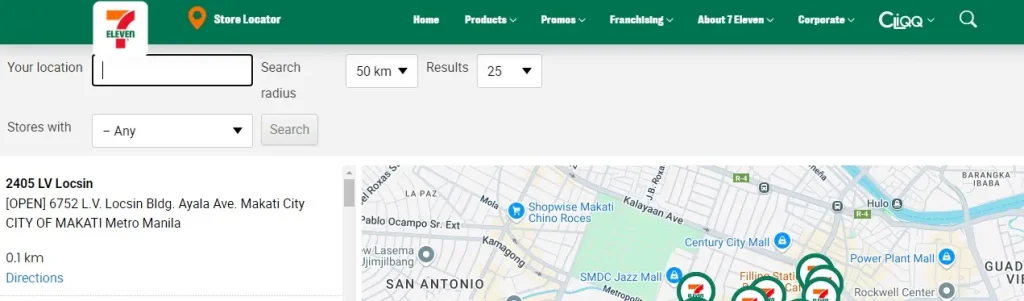
- Go to 7-Eleven Store Locator Page @7-eleven.com.ph/store-locator/.
- Enter the name of your city/town/village and click on Search button.
- Check the list of 7/11 stores near your location.
- Note down your nearest 7/11 store address.
I suggest you to note down the address of 2-3 stores near your location. In case the CLiQQ Kiosk is offline at one 7/11 store, you can go to the other store nearby it.
#Step 2: Visit Your Nearest 7/11 Store
Once you have the address, you need to search it on Maps on your mobile phone. Thereafter you should visit the 7/11 store to make NBI Fee Payment. All 7/11 stores remain open for 24 hours yet I suggest you to visit the store during daytime for your convenience.
#Step 3: Use CLiQQ Kiosk to Generate Payment Slip
As you reach the 7/11 store, ask the service employee if the CLiQQ Kiosk is online or offline. In case the CLiQQ Kiosk is offline, you should go to another 7/11 store in that region. If the CLiQQ Kiosk is online, follow the process given here to generate your NBI Payment Slip through the kiosk.
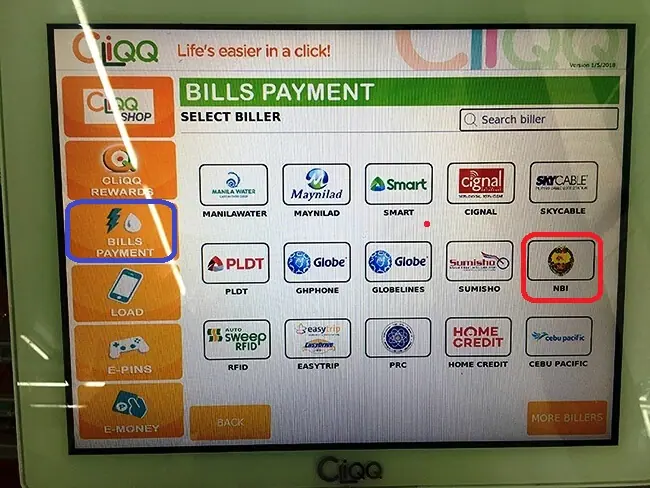
- Go to CLiQQ Kiosk Machine.
- Select Bills Payment section on kiosk screen.
- Select NBI to continue. If you cannot find NBI, click on Government and then select NBI to continue.
- Enter your NBI Reference Number correctly.
- Enter your contact number and NBI Fee Amount, then click on Next button.
- Verify that you have entered all the details correctly and click on Next button.
- Print NBI Payment Slip and move to the next step.
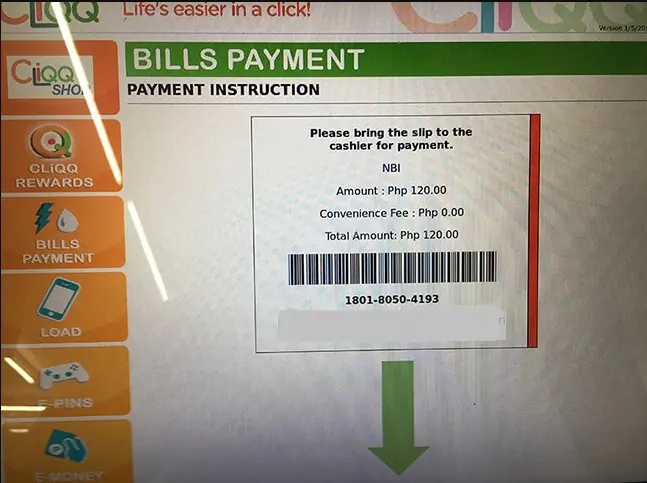
#Step 4: Pay NBI Fee to the Store Cashier
Take the NBI Payment Slip and go to Cashier’s desk in 7/11 store. Pay the NBI Clearance Fee to the cashier as mentioned in the payment slip.
#Step 5: Collect NBI Payment Receipt and Exit
The 7/11 store cashier will process your NBI Payment in their system and generate the NBI Payment Receipt for you. You should collect the receipt from cashier and exit the store.
Method 2: Pay NBI in 7/11 Using CLiQQ Mobile App
In first method, you need to generate NBI Payment Slip using the CLiQQ Kiosk at the 7/11 store. In second method, you can use CLiQQ App on your mobile to generate NBI Payment Slip at your home or office. But you need to visit the 7/11 store to pay your NBI Clearance Fee using that payment slip.
Get CLiQQ App for Android Mobile
Here I provide a step-by-step process to pay NBI Fee in 7/11 using CLiQQ Mobile App for Android/iPhone.
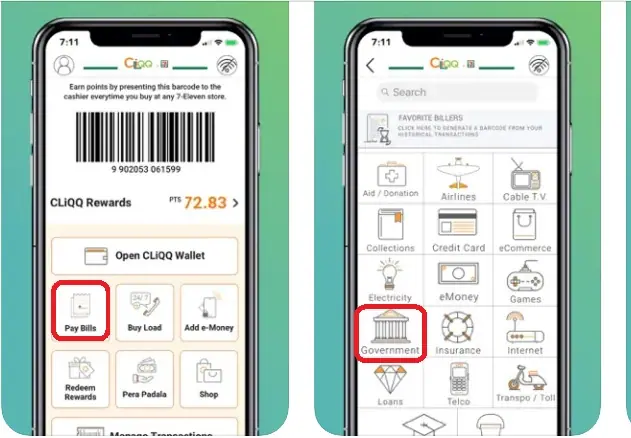
- Open CLiQQ App on your mobile.
- Register and Login to the app with required details.
- Find and Select Pay Bills option.
- Select Government and then select NBI.
- Enter your NBI Reference Number, Fee Amount and other details correctly. Click on Next button.
- Verify the entered details and click on Next button again.
- Print Payment Slip and take it to the 7/11 store near you.
- Go to cashier’s desk, give the payment slip and pay the NBI Clearance Fee.
- Collect NBI Payment Receipt from cashier and exit the store.
In this way, you can pay your NBI Clearance Fee with help of CLiQQ Mobile App and then visit the 7/11 store to complete the process.
Summary:
The NBI Clearance Applicant can make NBI Fee Payment via 7/11 and many other ways. I have explained two easiest ways to pay NBI in 7/11 with a step-by-step process.
After online application and appointment booking, you can select your NBI Fee Payment Method i.e. 7-Eleven (7/11). Thereafter you can pay your NBI Clearance Fee via 7/11 store using method 1 or method 2 that I have shared above.
In case you still have a confusion, you can ask it in the comment section given below.
FAQs
Can I pay my NBI Clearance Fee in 7/11 Store?
Yes, you can pay your NBI Clearance Fee in 7/11 Store.
Which 7/11 Store accepts NBI Clearance Fee?
There are 50+ 7/11 Stores situated across various parts of Philippines and all 7/11 stores accept NBI Clearance Fee at the store cashier’s desk.
Can I pay NBI Fee at a 7/11 Store on Sunday?
Yes, you can pay NBI Fee at a 7/11 Store on Sunday because all 7/11 Stores are open 24/7, so the store is always open and the NBI Fee Payment Service is available on Sunday as well.
What should I do before paying NBI in 7/11 store?
Before paying NBI in a 7/11 store near you, you must complete NBI Clearance Online Application and Appointment Booking Process. Then select 7-Eleven as your fee payment method. Thereafter you need to generate a payment slip for NBI Fee Payment.
How do I generate NBI Payment Slip for 7/11 store?
You can generate NBI Payment Slip using CLiQQ Kiosk at any 7/11 store and then use that slip to pay NBI Fee at the cashier’s desk. You can also use CLiQQ App to generate NBI Payment Slip and use it to pay NBI Fee at any 7/11 store cashier’s desk.



3 Comments