How to Pay NBI Clearance Fee Using GCash
National Bureau of Investigation takes nominal fee for issuing New NBI Clearance or its Renewal. When you apply for NBI Clearance Online, you need to book NBI Appointment and pay the NBI clearance fee. To make it easier, you can pay the NBI clearance fee using GCash on mobile.
The GCash is a mobile app available for Android and iPhone devices. It provides mobile recharge, utility bill payment, money transfer and government payment services.
How Can I Pay NBI Using GCash?
You can pay NBI using GCash with help of your NBI Reference Number. The NBI Reference Number is generated by NBI System when you complete filling up NBI Clearance Form and NBI Appointment Booking at the NBI website.
In order to pay NBI Clearance Fee via GCash, you should have a 10-digit NBI Reference Number. If you forgot to save it, you can sign in to the NBI website and check the Transactions section to find out the Reference Number. Then, use the Reference No. to pay NBI using GCash on your mobile phone.
How to Pay NBI Clearance Fee Using GCash
You must have GCash app on your mobile phone to pay NBI Clearance Fee Online. On completion of NBI Appointment Booking, you need to select GCash as your payment method and click on Proceed to generate a QR Code and NBI Reference Number for clearance fee payment via the GCash App.
There are two ways to pay NBI using GCash App as follows_
- Scan QR Code to Pay NBI Using GCash
- Enter Reference Number to Pay NBI Using GCash
Let me explain both the methods in detail with easy steps.
Scan QR Code to Pay NBI Using GCash
Make sure that you have the NBI Payment QR Code that was generated during NBI Clearance Application Process before you start the following process.

Note: Keep the NBI QR Code on a computer/other mobile or print it on paper to scan it from GCash App on your mobile.
- Open the GCash App on your mobile phone.
- Select the Scan to Pay option.
- Scan the NBI QR Code to continue.
- Check and enter the Clearance Fee Amount.
- Provide your Mobile Number and Email.
- Click on Next to open the payment page.
- Check & verify all the details.
- Click on Confirm and make the payment.
- Save and print the payment receipt.
Enter Reference Number to Pay NBI Using GCash
Keep the 10-digit NBI Reference Number handy when you start this process for NBI Clearance Fee Payment through GCash App. Here I provide the steps as under_
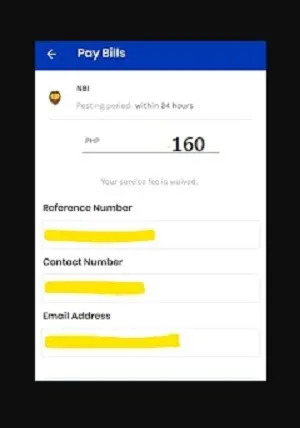
- Open GCash App on your mobile.
- Find and click on Pay Bills.
- Select the Government section.
- Enter or choose NBI.
- Enter the NBI Reference Number correctly.
- Enter the Fee Amount.
- Provide your Mobile Number and Email.
- Click on Next, and check all the details.
- Click on Confirm and make the payment.
- Save the fee payment receipt and print it.
In this way, you can pay your NBI Clearance Fee online using the GCash App on your mobile phone.
The GCash App allows you to pay the NBI Clearance easily and quickly. The Payment Reference Number, Payment Date & Time will show up on the payment receipt in GCash.

You can print the receipt and show it as a proof of fee payment during NBI Appointment at the NBI Office.
How to Check NBI Payment Status
After you complete the NBI Fee Payment Process in the GCash App, you need to check payment status online at NBI website. The GCash may take from 10 minutes to 24 hours to reflect the fee payment status on NBI website.
So, I suggest you check NBI Fee Payment Status after 24 hours of NBI Payment thru GCash App.
- Go to NBI Clearance website @clearance.nbi.gov.ph.
- Enter your Email and Password in the login section.
- Click on Sign In button to continue.
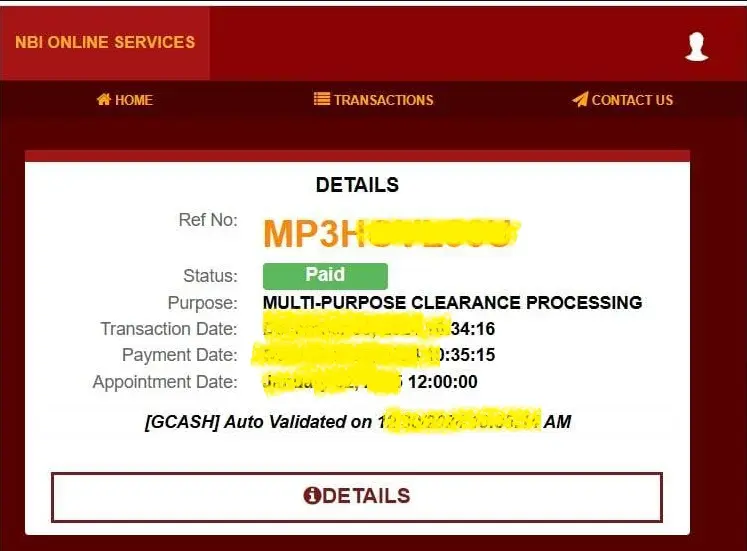
- After login, select Transactions tab on left side.
- Check the recent NBI Transaction with the NBI Reference Number that you entered when paying NBI using GCash App.
- The fee payment status should show up as Paid in green colour.
- If the fee payment status shows Pending after 24 hours, you can contact NBI Helpline 8523 82 31 to 38 to raise the query.
In this way, you can check NBI Payment Status Online to confirm if the NBI has received your clearance fee or not.
Advantages and Disadvantages of NBI Payment via GCash
The NBI offers a variety of payment methods for NBI Clearance Fee Payment for new clearance and renewal applications. Out of them, GCash is one of the popular online payment methods used by many applicants. Here I provide the advantages and disadvantages of paying NBI thru GCash App as follows_
Advantages of Using GCash:
- Easy and Quick: The GCash App offers easy and quick payment to NBI from your mobile phone. If you have the NBI Reference Number, you can complete the payment using GCash in just two minutes.
- 24/7 Access: You can access the GCash App on your mobile anytime without any restriction or interruption. So, you can pay NBI Fee thru GCash on your suitable time as per your convenience.
- No Long Queues: The GCash App helps you to avoid standing in long queues at the NBI Office or bank or Bayad Center or other outlets for NBI Fee Payment.
- Secure Transactions: Your each transaction on GCash is highly secure and encrypted. The GCash protects your personal and financial data to offer maximum security during online transactions.
- Cashless Payment: You do not need to carry cash to the bank or NBI Office if you choose GCash for NBI Clearance Fee Payment. The fee amount is debited directly from your bank account or credit card or GCash wallet as you select.
- Transaction History: You can check the transaction history in GCash to check if your NBI Payment was successful. It shows the payment reference number as well as the exact payment date & time in transaction history section.
Disadvantages of Using GCash:
- Service Fee: When you pay the NBI Clearance Fee through GCash, it takes the service fee. All e-payment service providers charge a service fee for online payments to NBI using their app or website or outlet or card. If you want to save money, you can choose to pay your clearance fee at the NBI Office.
Conclusion:
The NBI Clearance Fee Payment through GCash is a popular online payment method used by most people who apply for NBI Clearance in Philippines. I have explained how to pay NBI using GCash App by two different methods.
If you have faced any problem in paying NBI Fee via GCash online, you can contact NBI Clearance Helpline or GCash Help Center. In case you have a doubt/query about NBI Payment via GCash, ask your query in the comment section below.
FAQs
Does NBI Accept Fee Payment via GCash?
Yes, the NBI accepts fee payment via GCash and many other online and offline payment methods. You need to pay NBI Clearance Fee when you apply for NBI Clearance Online at NBI website. You also need to pay the fee when you apply for NBI Clearance Renewal Online.
You can select GCash as your payment method to make NBI Payment thru GCash for your clearance application. Thereafter you can make payment using GCash App on your mobile phone.
Can I use GCash for NBI Clearance payments?
Yes, you can use GCash for NBI Clearance Payment Online.
What data are needed for NBI Payment thru GCash?
The NBI Reference Number, your Contact Number, Email and Fee Amount are needed for NBI Payment thru GCash.
How much is NBI Clearance Fee if I pay using GCash?
If you pay using GCash App, the NBI Clearance Fee is ₱ 160 including the clearance fee plus service fee.